AWS Access
AWS Authentication
Controller's Pod Identity
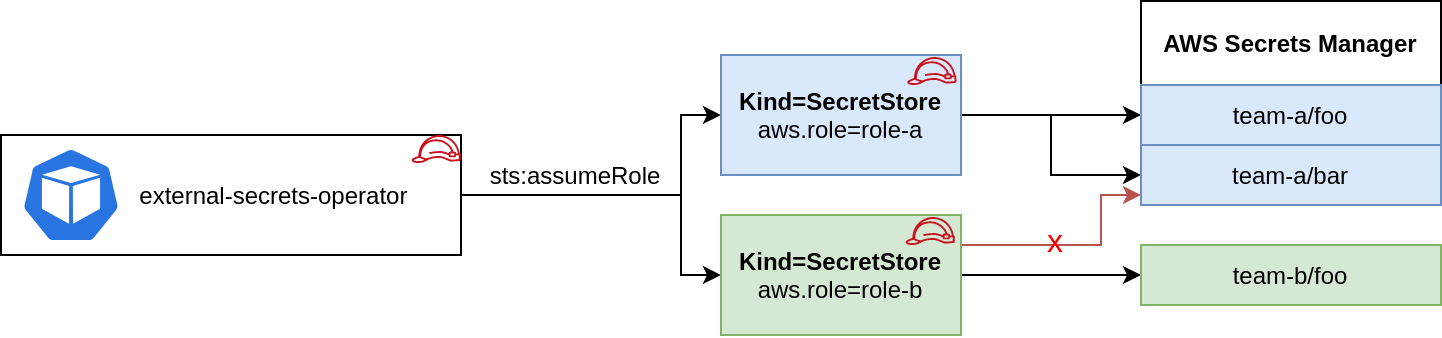
Note: If you are using Parameter Store replace service: SecretsManager with service: ParameterStore in all examples below.
This is basically a zero-configuration authentication method that inherits the credentials from the runtime environment using the aws sdk default credential chain.
You can attach a role to the pod using IRSA, kiam or kube2iam. When no other authentication method is configured in the Kind=Secretstore this role is used to make all API calls against AWS Secrets Manager or SSM Parameter Store.
Based on the Pod's identity you can do a sts:assumeRole before fetching the secrets to limit access to certain keys in your provider. This is optional.
apiVersion: external-secrets.io/v1
kind: SecretStore
metadata:
  name: team-b-store
spec:
  provider:
    aws:
      service: SecretsManager
      region: eu-central-1
      # optional: do a sts:assumeRole before fetching secrets
      role: team-b
Access Key ID & Secret Access Key
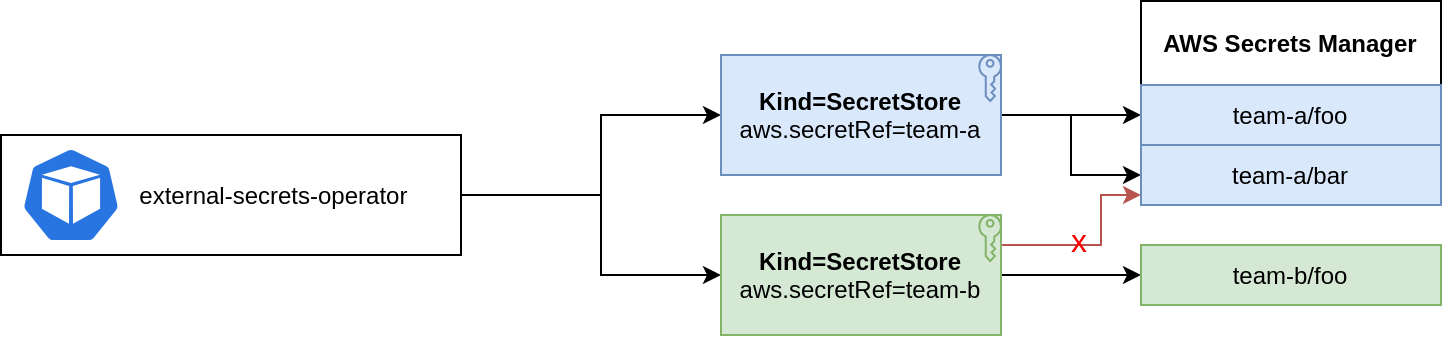
You can store Access Key ID & Secret Access Key in a Kind=Secret and reference it from a SecretStore.
apiVersion: external-secrets.io/v1
kind: SecretStore
metadata:
  name: team-b-store
spec:
  provider:
    aws:
      service: SecretsManager
      region: eu-central-1
      # optional: assume role before fetching secrets
      role: team-b
      auth:
        secretRef:
          accessKeyIDSecretRef:
            name: awssm-secret
            key: access-key
          secretAccessKeySecretRef:
            name: awssm-secret
            key: secret-access-key
NOTE: In case of a ClusterSecretStore, Be sure to provide namespace in accessKeyIDSecretRef, secretAccessKeySecretRef with the namespaces where the secrets reside.
EKS Service Account credentials
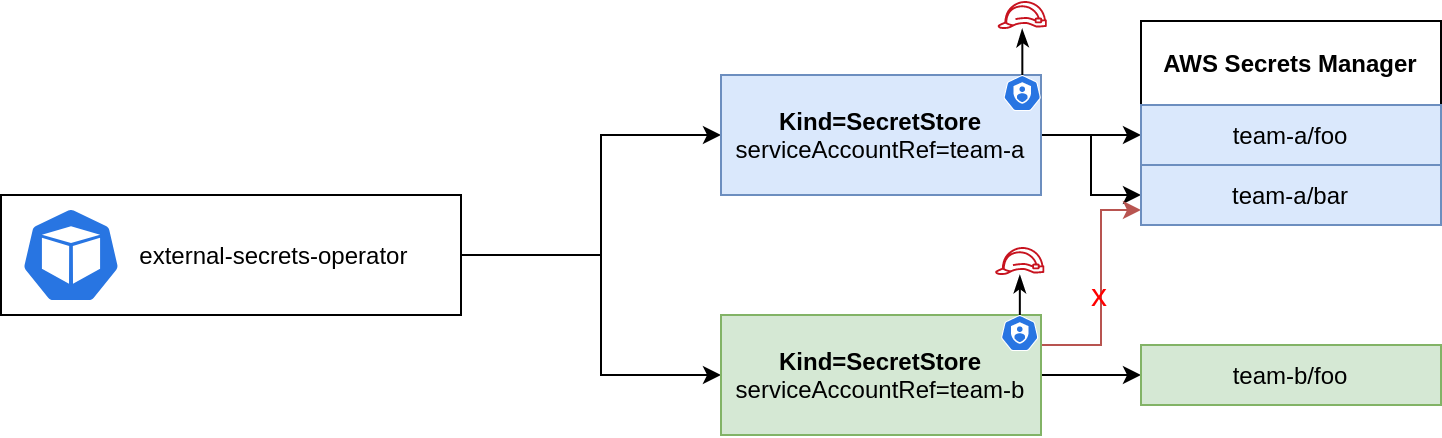
This feature lets you use short-lived service account tokens to authenticate with AWS. You must have Service Account Volume Projection enabled - it is by default on EKS. See EKS guide on how to set up IAM roles for service accounts.
The big advantage of this approach is that ESO runs without any credentials.
apiVersion: v1
kind: ServiceAccount
metadata:
  annotations:
    eks.amazonaws.com/role-arn: arn:aws:iam::123456789012:role/team-a
  name: my-serviceaccount
  namespace: default
Reference the service account from above in the Secret Store:
apiVersion: external-secrets.io/v1
kind: SecretStore
metadata:
  name: secretstore-sample
spec:
  provider:
    aws:
      service: SecretsManager
      region: eu-central-1
      auth:
        jwt:
          serviceAccountRef:
            name: my-serviceaccount
NOTE: In case of a ClusterSecretStore, Be sure to provide namespace for serviceAccountRef with the namespace where the service account resides.
EKS Pod Identity Setup
In order to use EKS Pod Identity Agent, create a role like this:
{
    "Statement": [
        {
            "Action": [
                "secretsmanager:GetResourcePolicy",
                "secretsmanager:GetSecretValue",
                "secretsmanager:DescribeSecret",
                "secretsmanager:ListSecretVersionIds"
            ],
            "Effect": "Allow",
            "Resource": [
                "*"
            ]
        }
    ],
    "Version": "2012-10-17"
}
{
    "Version": "2012-10-17",
    "Statement": [
        {
            "Sid": "AllowEksAuthToAssumeRoleForPodIdentity",
            "Effect": "Allow",
            "Principal": {
                "Service": "pods.eks.amazonaws.com"
            },
            "Action": [
                "sts:AssumeRole",
                "sts:TagSession"
            ]
        }
    ]
}
Install ESO using helm and define these values:
serviceAccount:
  annotations:
  name: external-secrets
Create a pod association:
aws eks create-pod-identity-association --cluster-name my-cluster --role-arn arn:aws:iam::111122223333:role/my-role --namespace external-secrets --service-account external-secrets
Then create a secret store like this:
apiVersion: external-secrets.io/v1
kind: SecretStore
metadata:
  name: store
spec:
  provider:
    aws:
      service: SecretsManager
      region: eu-central-1
Note: serviceAccountRef cannot be used together with EKS Pod Identity. That's because ESO can not impersonate
service accounts which have iam roles bound using pod identity. Doing so will result in an error like this:
unable to create session: an IAM role must be associated with service account ...
Note: No auth section is defined for the SecretStore.
Note: For even more details you can follow this post for more setup and information using Terraform here.
Custom Endpoints
You can define custom AWS endpoints if you want to use regional, vpc or custom endpoints. See List of endpoints for Secrets Manager, Secure Systems Manager and Security Token Service.
Use the following environment variables to point the controller to your custom endpoints. Note: All resources managed by this controller are affected.
| ENV VAR | DESCRIPTION |
|---|---|
| AWS_SECRETSMANAGER_ENDPOINT | Endpoint for the Secrets Manager Service. The controller uses this endpoint to fetch secrets from AWS Secrets Manager. |
| AWS_SSM_ENDPOINT | Endpoint for the AWS Secure Systems Manager. The controller uses this endpoint to fetch secrets from SSM Parameter Store. |
| AWS_STS_ENDPOINT | Endpoint for the Security Token Service. The controller uses this endpoint when creating a session and when doing assumeRole or assumeRoleWithWebIdentity calls. |
| AWS_ECR_ENDPOINT | Endpoint for the ECR Service. The controller uses this endpoint to fetch authorization tokens from ECR. |
| AWS_ECR_PUBLIC_ENDPOINT | Endpoint for the Public ECR Service. The controller uses this endpoint to fetch authorization tokens from ECR. |
STS Session Tags
You can have ESO automatically include Kubernetes context data into STS session tags when assuming an IAM role. These tags can be used in IAM policy conditions to implement attribute-based access control (ABAC).
The behavior is controlled by setting the optional spec.provider.aws.sessionTagsPolicy field on a SecretStore, which can be set to one of the following values:
| Policy | Description |
|---|---|
None |
Default. No session tags are added. |
Simple |
Automatically adds esoNamespace, esoStoreName, and esoStoreKind tags. |
Custom |
Adds the same three built-in tags plus any additional tags defined in customSessionTags. |
The automatically added tags are derived from the store configuration and the namespace of the ExternalSecret:
| Tag | Value |
|---|---|
esoNamespace |
The namespace of the ExternalSecret making the request. |
esoStoreName |
The name of the SecretStore or ClusterSecretStore. |
esoStoreKind |
The kind of the store (SecretStore or ClusterSecretStore). |
Session tags are configured per secret store. If using spec.dataFrom[].sourceRef.storeRef to reference secrets from multiple different stores, each store must be configured with the desired sessionTagsPolicy independently. Although the session tags for each secret will have the name and kind of the specified secret store, they'll all share the same namespace which comes from the ExternalSecret.
Simple Policy
apiVersion: external-secrets.io/v1
kind: SecretStore
metadata:
  name: team-b-store
  namespace: team-b
spec:
  provider:
    aws:
      service: SecretsManager
      region: eu-central-1
      role: team-b
      sessionTagsPolicy: Simple
Session tags will include esoNamespace=team-b, esoStoreName=team-b-store, and esoStoreKind=SecretStore.
Custom Policy
apiVersion: external-secrets.io/v1
kind: SecretStore
metadata:
  name: team-b-store
  namespace: team-b
spec:
  provider:
    aws:
      service: SecretsManager
      region: eu-central-1
      role: team-b
      sessionTagsPolicy: Custom
      customSessionTags:
        env: production
        team: platform
Session tags will include the three automatically added tags, plus env=production and team=platform.
NOTE: Custom tags with empty keys or empty values are silently ignored. Built-in tags (esoNamespace, esoStoreName, esoStoreKind) will always be included even when the sessionTagsPolicy is Custom. They cannot be overridden via customSessionTags.
Required IAM Permissions
When session tags are enabled, the role trust policy must allow sts:TagSession:
{
  "Version": "2012-10-17",
  "Statement": [
    {
      "Effect": "Allow",
      "Principal": { "AWS": "arn:aws:iam::111122223333:role/eso-controller" },
      "Action": ["sts:AssumeRole", "sts:TagSession"]
    }
  ]
}
