Pulumi ESC
Pulumi ESC
Sync environments, configs and secrets from Pulumi ESC to Kubernetes using the External Secrets Operator.
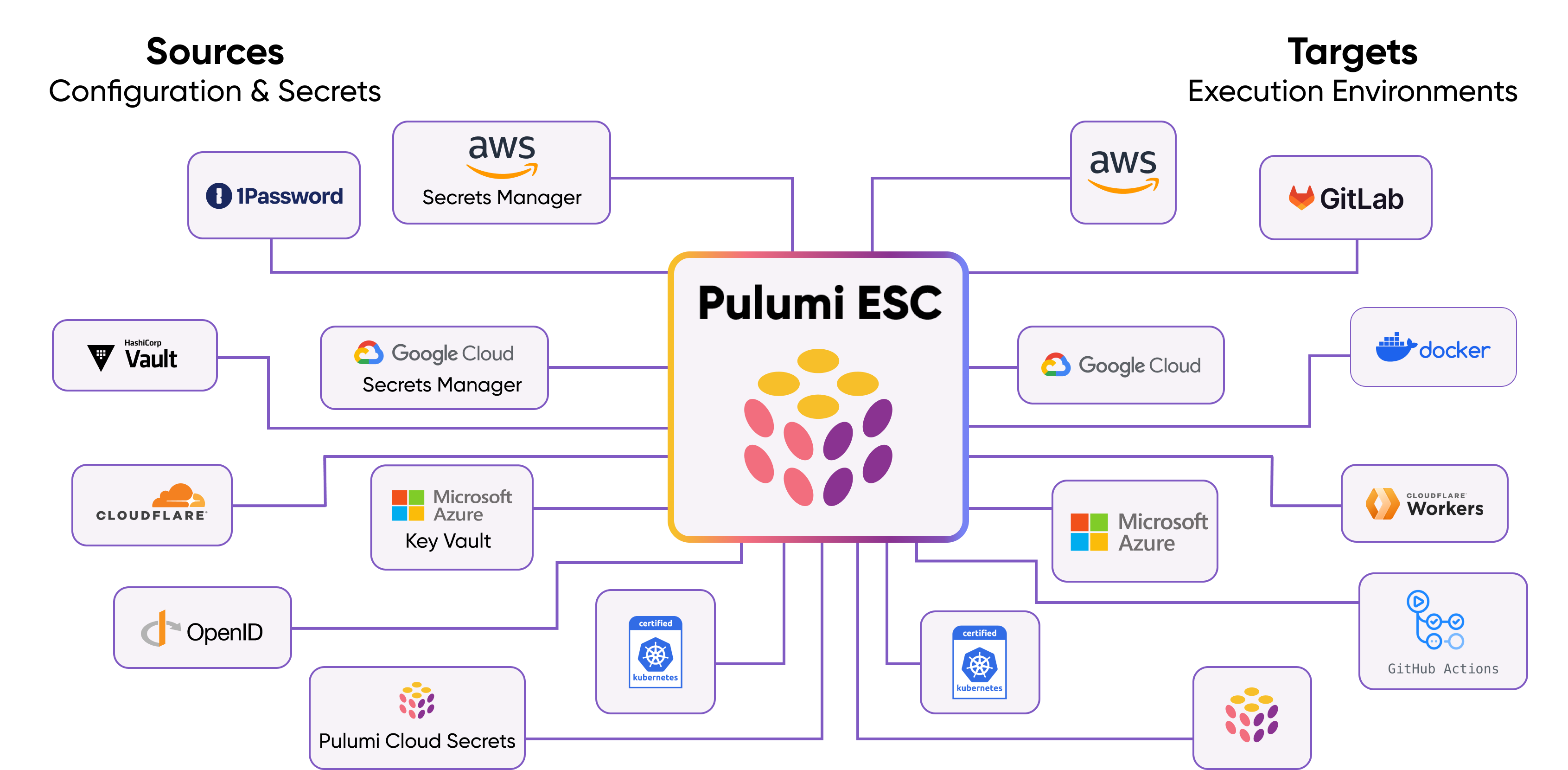
More information about setting up Pulumi ESC can be found in the Pulumi ESC documentation.
Authentication
The Pulumi provider supports two authentication methods:
- Access Token (recommended for most use cases): Use Pulumi Access Tokens stored in Kubernetes secrets.
- OIDC (recommended for workload identity): Use Kubernetes ServiceAccount tokens to authenticate via OIDC, eliminating the need to store static credentials.
Creating a SecretStore
Using Access Token
A Pulumi SecretStore can be created by specifying the organization, project and environment and referencing a Kubernetes secret containing the accessToken.
apiVersion: external-secrets.io/v1
kind: SecretStore
metadata:
  name: secret-store
spec:
  provider:
    pulumi:
      organization: <NAME_OF_THE_ORGANIZATION>
      project: <NAME_OF_THE_PROJECT>
      environment: <NAME_OF_THE_ENVIRONMENT>
      auth:
        accessToken:
          secretRef:
            name: <NAME_OF_KUBE_SECRET>
            key: <KEY_IN_KUBE_SECRET>
Note: The deprecated accessToken field at the root level is still supported for backward compatibility, but using auth.accessToken is recommended.
Using OIDC
Alternatively, you can use OIDC authentication with Kubernetes ServiceAccount tokens. This method eliminates the need to store static credentials.
First, configure OIDC in your Pulumi organization by following the Pulumi OIDC documentation.
Then create a ServiceAccount and SecretStore:
apiVersion: v1
kind: ServiceAccount
metadata:
  name: pulumi-oidc-sa
  namespace: default
---
apiVersion: external-secrets.io/v1
kind: SecretStore
metadata:
  name: pulumi-oidc-store
  namespace: default
spec:
  provider:
    pulumi:
      organization: my-org
      project: my-project
      environment: production
      auth:
        oidcConfig:
          organization: my-org
          serviceAccountRef:
            name: pulumi-oidc-sa
          expirationSeconds: 600  # Optional: defaults to 600 (10 minutes)
The expirationSeconds field is optional and defaults to 600 seconds (10 minutes).
If required, the API URL (apiUrl) can be customized as well. If not specified, the default value is https://api.pulumi.com/api/esc.
Creating a ClusterSecretStore
Using Access Token
Similarly, a ClusterSecretStore can be created by specifying the namespace and referencing a Kubernetes secret containing the accessToken.
apiVersion: external-secrets.io/v1
kind: ClusterSecretStore
metadata:
  name: secret-store
spec:
  provider:
    pulumi:
      organization: <NAME_OF_THE_ORGANIZATION>
      project: <NAME_OF_THE_PROJECT>
      environment: <NAME_OF_THE_ENVIRONMENT>
      auth:
        accessToken:
          secretRef:
            name: <NAME_OF_KUBE_SECRET>
            key: <KEY_IN_KUBE_SECRET>
            namespace: <NAMESPACE>
Using OIDC
For ClusterSecretStore with OIDC, you need to specify the ServiceAccount namespace:
apiVersion: v1
kind: ServiceAccount
metadata:
  name: pulumi-oidc-sa
  namespace: external-secrets
---
apiVersion: external-secrets.io/v1
kind: ClusterSecretStore
metadata:
  name: pulumi-oidc-cluster-store
spec:
  provider:
    pulumi:
      organization: my-org
      project: my-project
      environment: production
      auth:
        oidcConfig:
          organization: my-org
          serviceAccountRef:
            name: pulumi-oidc-sa
            namespace: external-secrets
          expirationSeconds: 600
Referencing Secrets
Secrets can be referenced by defining the key containing the JSON path to the secret. Pulumi ESC secrets are internally organized as a JSON object.
apiVersion: external-secrets.io/v1
kind: ExternalSecret
metadata:
  name: secret
spec:
  refreshInterval: 1h0m0s
  secretStoreRef:
    kind: SecretStore
    name: secret-store
  data:
  - secretKey: <KEY_IN_KUBE_SECRET>
    remoteRef:
      key: <PULUMI_PATH_SYNTAX>
Note: key is not following the JSON Path syntax, but rather the Pulumi path syntax.
Examples
- root
- root.nested
- root["nested"]
- root.double.nest
- root["double"].nest
- root["double"]["nest"]
- root.array[0]
- root.array[100]
- root.array[0].nested
- root.array[0][1].nested
- root.nested.array[0].double[1]
- root["key with \"escaped\" quotes"]
- root["key with a ."]
- ["root key with \"escaped\" quotes"].nested
- ["root key with a ."][100]
- root.array[*].field
- root.array["*"].field
See Pulumi's documentation for more information.
PushSecrets
With the latest release of Pulumi ESC, secrets can be pushed to the Pulumi service. This can be done by creating a PushSecrets object.
Here is a basic example of how to define a PushSecret object:
apiVersion: external-secrets.io/v1alpha1
kind: PushSecret
metadata:
  name: push-secret-example
spec:
  refreshInterval: 1h0m0s
  selector:
    secret:
      name: <NAME_OF_KUBE_SECRET>
  secretStoreRefs:
  - kind: ClusterSecretStore
    name: secret-store
  data:
  - match:
      secretKey: <KEY_IN_KUBE_SECRET>
      remoteRef:
        remoteKey: <PULUMI_PATH_SYNTAX>
This will then push the secret to the Pulumi service. If the secret already exists, it will be updated.
Limitations
Currently, the Pulumi provider only supports nested objects up to a depth of 1. Any nested objects beyond this depth will be stored as a string with the JSON representation.
This Pulumi ESC example:
values:
  backstage:
    my: test
    test: hello
    test22:
      my: hello
    test33:
      world: true
    x: true
    num: 42
Will result in the following Kubernetes secret:
my: test
num: "42"
test: hello
test22: '{"my":{"trace":{"def":{"begin":{"byte":72,"column":11,"line":6},"end":{"byte":77,"column":16,"line":6},"environment":"tgif-demo"}},"value":"hello"}}'
test33: '{"world":{"trace":{"def":{"begin":{"byte":103,"column":14,"line":8},"end":{"byte":107,"column":18,"line":8},"environment":"tgif-demo"}},"value":true}}'
x: "true"
